Sunday, 2 May 2021

Monday, 19 April 2021
EMBEDDING YOUTUBE PLAYLISTS
This used to be easy.
Then Google made it tricky.
They still have don't be evil as their corporate motto...
Its simple enough, but doesn't really stick in the mind to be fair! So, I've vodcasted how, and also copy/pasted key text in below....with colour highlighting...and I had to screenshot the 2nd bit as otherwise it would be interpreted as code by blogger...

Then Google made it tricky.
They still have don't be evil as their corporate motto...
Its simple enough, but doesn't really stick in the mind to be fair! So, I've vodcasted how, and also copy/pasted key text in below....with colour highlighting...and I had to screenshot the 2nd bit as otherwise it would be interpreted as code by blogger...
Then paste the playlist ID after the "=".
The video above has the usual, single video embed code; its that bit AFTER EMBED/ to look for - replace the video ID with "videoseries?list=" [the PL ID goes between the = and "]
 |
| This is a normal, single vid example |
Wednesday, 25 November 2020
Switching between Premiere FCPX Resolve using XML file
I don't use either so can't confirm that this is as simple as using the XML file - you'd certainly need to be keeping all files on the same drive, as XML is just a spreadsheet LINKING to files and noting edits. There would be issues with fonts/FX not in the other software? Anyway...
I do note that for FCPX to Premiere you need to pay for additional software. But if you're using Adobe you're obviously happy to continually shell out more and more each year, unlike the simple lifetime purchase of FCPX - cheaper AND bundled with Logic, Motion etc if bought with a new Mac from an Apple store.
Sunday, 22 November 2020
TOUCHSCREEN MACBOOK
You can now use an iPad to achieve this, with the new OS bringing iOS functionality to the desktop OS.
This is a USBC 13/15" screen - see https://www.forbes.com/sites/bensin/2020/07/23/this-portable-display-brings-touchscreen-functionality-to-macbooks/
Friday, 11 September 2020
BLOGGER new way to embed videos
Who knows how such data-driven giants can make such dumb, careless decisions, but they've made a right mess of the Blogger interface.
The old, simple method of pasting an embed code, checking just ONCE...EVER that interpret HTML is selected in OPTIONS has been mysteriously ditched - and you can't change the default to just display HTML.
So, I've figured out a way to do it.
Always do --- + return + ---, to paste into the blank line
type H + return a few times
Now, change the view from compose to HTML (the icon on the very left)
Look for the H's (you'll see br or p tags after them.
Paste your embed code in before the 1st H (as in my screenshot)
Switch back to compose mode + hit preview to check.
It should work...
Delete the H's!
Now say rude things about Google!
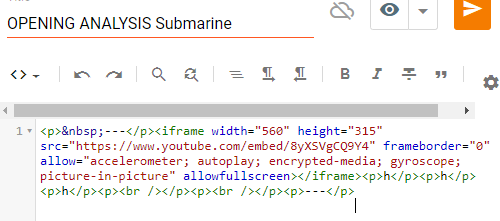
---
H
H
H
---
Saturday, 21 March 2020
CONVERGENCE future is now: wipe moving objects with FCPX plug-in
It's 20 years since I oversaw my 1st student coursework assignment, having created some ... interesting productions myself with fellow PGCE (teaching degree) students with a big old VHS camera and an agonisingly slow post-production digitisation process.
As much as I've been teaching on the concept of convergence for a lot of that time, I'm truly astonished at what popped up on my Google news feed this morning. This is an incredible example of where we're at with convergence, which is not just the barriers between industries crumbling but equally the gap between professional and consumer/prosumer technology radically narrowing.
For $30 (on offer from $50) you can do in Final Cut what very recently would have required a highly-paid team of VFX specialists working for days to do ... You can remove moving objects from a scene!!!
I haven't tried it out yet - to test for example if it works with wobbly camera shots or short takes (logically it needs the background it will use to be visible for at least 1 frame) - but definitely intend to buy it.
I'm not easily impressed but this is a genuine jaw-dropping moment. A decade ago my classes were just transitioning from iMovie to Final Cut Express 4 before we finally got the budget to move to Final Cut Pro X. Those licenses are still in place back in my previous school in England - I make no apology for highlighting that a purchase of Final Cut is a one-off lifetime payment, with two big updates/upgrades every year (in contrast to the Adobe Premiere subscription model). I've fought for and gotten Final Cut/Macs installed in several schools now, and would do so again if I started afresh somewhere else.
The power the student of 2020 and beyond has in their hands is absolutely incredible - I hope to see many more fantastic uses of it!!
https://youtu.be/vWqe3iePbzM
The website link is in the video description
Thursday, 19 March 2020
FCPX Sharing full Library using Compressor
Thus technique definitely isn't for all! It's quite complex (though the video is a very clear step by step) AND requires the additional programme Compressor to work.
Ideally you can build and share a main Library first, then share additional clips as they come in, keeping file names and tags identical so that project files (the tiny XML files) can be shared via email. But this is an alternative if there's going to be gap in meeting up. The idea is to radically reduce (to 20%) the file size of the source video clips for easy online sharing. Once complete, a shared project file can be re-linked to the original full size media.
https://youtu.be/iyos9dP4eL0
Subscribe to:
Posts (Atom)