Showing posts with label embed. Show all posts

Monday, 13 March 2023

BLOGGER embedding PowerPoint or Word as pdf through Canva

 All the instructions are contained below, including screenshots from when I made this post...

BLOGGER EMBEDDING DOCS.pdf by Dave B

finish

Monday, 19 April 2021

EMBEDDING YOUTUBE PLAYLISTS

This used to be easy.
Then Google made it tricky.
They still have don't be evil as their corporate motto...

Its simple enough, but doesn't really stick in the mind to be fair! So, I've vodcasted how, and also copy/pasted key text in below....with colour highlighting...and I had to screenshot the 2nd bit as otherwise it would be interpreted as code by blogger...


    In the place of the video ID (after "embed/"), substitute "videoseries?list=".
    Then paste the playlist ID after the "=".


    The video above has the usual, single video embed code; its that bit AFTER EMBED/ to look for - replace the video ID with "videoseries?list=" [the PL ID goes between the = and "]


    This is a normal, single vid example


    Friday, 19 February 2016

    USEFUL TECHNOLOGIES Soundcloud Divshare + embedding podcasts/MP3s

    This should be familiar by now, but just in case... Take note of the instructions on how to change gadget sizes (works with all sorts of gadgets).

    Since originally posting, I've largely switched to SoundCloud, which is widely used by musicians in particular, but so long as you can upload and generate an embed code to post within your blog you could use any site from dozens that offer this facility.

    SoundCloud

    Don't use YouTube for podcasts.
    A GCSE student making use of SoundCloud

    RESIZING THE SOUNDLOUD EMBEDDED PLAYER
    The default player is rather large!
    Below I'll show you how to alter the size, so you can (if you wish) get something like this:


    Thats a bit extreme: WIDTH 20% HEIGHT 100

    Wednesday, 17 February 2016

    USEFUL TECHNOLOGIES: YouTube resize, playlists, privacy, annotation, editing tools

    YouTube has a variety of functions which you can make use of.

    I've highlighted two examples below; use YouTube's own help channel or the Google help page to learn more - for example on editing a video you've uploaded to YouTube, annotating it ... there's a lot you can do!

    Make sure you always consider carefully the title and description of your uploads - don't just leave it with the Final Cut auto-text. Adding tags will help create an audience for your work too, and shows an understanding of media conventions too.

    CUSTOMISE THE SIZE OF VIDEO EMBEDS ON YOUR BLOG
    You get this option with most sites that allow you to embed uploaded content (video, audio, documents...).
    If you're embedding the smallest (default) YouTube player, you're not doing it right.

    This means the user can't access most of the tools YouTube makes available through its player, as there is no space to display these.

    So ... you simply click on 'show more' when in the Share dialogue and select a different size.
    Test it out to ensure it has made a difference.

    You can also choose to include a playlist if it is part of one.
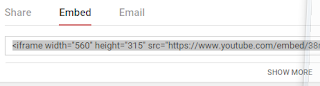
    The standard SHARE>EMBED view. You need to click SHOW MORE...

    If the video is part of a playlist you can choose whether or not to select this