Showing posts with label YouTube. Show all posts

Monday, 19 April 2021

EMBEDDING YOUTUBE PLAYLISTS

This used to be easy.
Then Google made it tricky.
They still have don't be evil as their corporate motto...

Its simple enough, but doesn't really stick in the mind to be fair! So, I've vodcasted how, and also copy/pasted key text in below....with colour highlighting...and I had to screenshot the 2nd bit as otherwise it would be interpreted as code by blogger...


    In the place of the video ID (after "embed/"), substitute "videoseries?list=".
    Then paste the playlist ID after the "=".


    The video above has the usual, single video embed code; its that bit AFTER EMBED/ to look for - replace the video ID with "videoseries?list=" [the PL ID goes between the = and "]


    This is a normal, single vid example


    Monday, 25 April 2016

    USEFUL TECHNOLOGIES: YouTube audience analysis

    As well as branding your own channel, and using the other tools covered here, you can analyse your audience demographics and engagement (check the gender or age breakdown, the countries views are coming from, the sources (websites), and even how long individual videos are typically viewed for. You can also create graphs of audience engagement (subscriber numbers, dis/likes, comments) over a period of time you specify:
    TO ACCESS: click on the 3 lines beside the YouTube logo; click on  My Channel. Then click on Video Manager and you can access your audience data.

    Friday, 19 February 2016

    USEFUL TECHNOLOGIES: Prezi + other PowerPoint alternatives

    When evaluating your work, you need to comment and reflect on your own use of technology, including in the Evaluation itself; you are marked on your use of technology - and on how creatively you have used a variety of technologies.

    So, whilst you may wish to upload a PowerPoint to slideshare (or equivalent), you would be advised to think of alternatives too.

    Prezi is probably the best known interactive multimedia alternative; you build your Prezi through its website and get an embed code. It provides options for a pre-programmed route through your content and/or manual control and selection by the user, and can feature embedded videos etc.

    There is a Prezi YouTube channel - their playlist is embedded below - if you prefer, they also provide web pages to guide you.


    Wednesday, 17 February 2016

    USEFUL TECHNOLOGIES: YouTube resize, playlists, privacy, annotation, editing tools

    YouTube has a variety of functions which you can make use of.

    I've highlighted two examples below; use YouTube's own help channel or the Google help page to learn more - for example on editing a video you've uploaded to YouTube, annotating it ... there's a lot you can do!

    Make sure you always consider carefully the title and description of your uploads - don't just leave it with the Final Cut auto-text. Adding tags will help create an audience for your work too, and shows an understanding of media conventions too.

    CUSTOMISE THE SIZE OF VIDEO EMBEDS ON YOUR BLOG
    You get this option with most sites that allow you to embed uploaded content (video, audio, documents...).
    If you're embedding the smallest (default) YouTube player, you're not doing it right.

    This means the user can't access most of the tools YouTube makes available through its player, as there is no space to display these.

    So ... you simply click on 'show more' when in the Share dialogue and select a different size.
    Test it out to ensure it has made a difference.

    You can also choose to include a playlist if it is part of one.
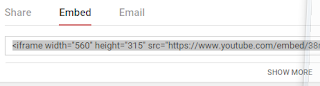
    The standard SHARE>EMBED view. You need to click SHOW MORE...

    If the video is part of a playlist you can choose whether or not to select this 

    Thursday, 16 July 2015

    Downloading YouTube clips UPDATE

    https://www.4kdownload.com/products/product-videodownloader


    https://ytmp3cc.cc/

    https://mp3-youtube.download/en/converter
    OR
    https://youtube-mp4.download/en/converter


    https://9to5mac.com/2019/07/06/mac-video-editor-4k-videoproc/

    A SoundCloud site is detailed at the bottom.

    ----
    http://convert2mp3.net/en/index.php
    ----
    https://www.onlinevideoconverter.com/mp3-converter
    ----


    OffLiberty provides a simple service: paste your link in the search bar, select audio or video and click on the result when processed to start the download.

    1: Paste the link into the search bar, hit return

    2: It will process...

     3: Left-click on the video or audio option (yellow box) to download


    ...........................................................................................................................................................
    ClipConverter, which I've previously used, has an issue - it launches new windows which seek to install viruses.
    So, another option: http://en.savefrom.net/

    Also: http://www.onlinevideoconverter.com/

    I've tried it out just the once so far, but seems to work fine...
    ***use the website, DON'T install the browser add-on!!!***
    I did that yesterday and my anti-virus caught a trojan. No issues with the website so far (6 months of using) though...

    SOUNDCLOUD