YouTube has a variety of functions which you can make use of.
I've highlighted two examples below; use
YouTube's own help channel or the
Google help page to learn more - for example on editing a video you've uploaded to YouTube, annotating it ... there's a lot you can do!
Make sure you always consider carefully the title and description of your uploads - don't just leave it with the Final Cut auto-text. Adding tags will help create an audience for your work too, and shows an understanding of media conventions too.
CUSTOMISE THE SIZE OF VIDEO EMBEDS ON YOUR BLOG
You get this option with most sites that allow you to embed uploaded content (video, audio, documents...).
If you're embedding the smallest (default) YouTube player, you're not doing it right.
This means the user can't access most of the tools YouTube makes available through its player, as there is no space to display these.
So ... you simply click on 'show more' when in the Share dialogue and select a different size.
Test it out to ensure it has made a difference.
You can also choose to include a playlist if it is part of one.
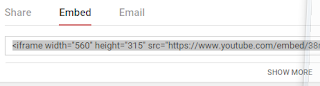 |
| The standard SHARE>EMBED view. You need to click SHOW MORE... |
 |
| If the video is part of a playlist you can choose whether or not to select this |